
Tenant portal: fewer calls about payments, contracts and repairs
A tenant portal earns its place if it answers what reaches you by phone today: what to pay, to which account, where the lease is, how to get there and who to tell about a repair. Rentamos does it in 7 languages and on mobile, and repair requests arrive with a category, photos and entry permission.
Key facts
- The Rentamos tenant portal is available in 7 languages, including English and Spanish.
- Move-in is tracked in 5 steps: contract, payment, confirmation, check-in and check-out.
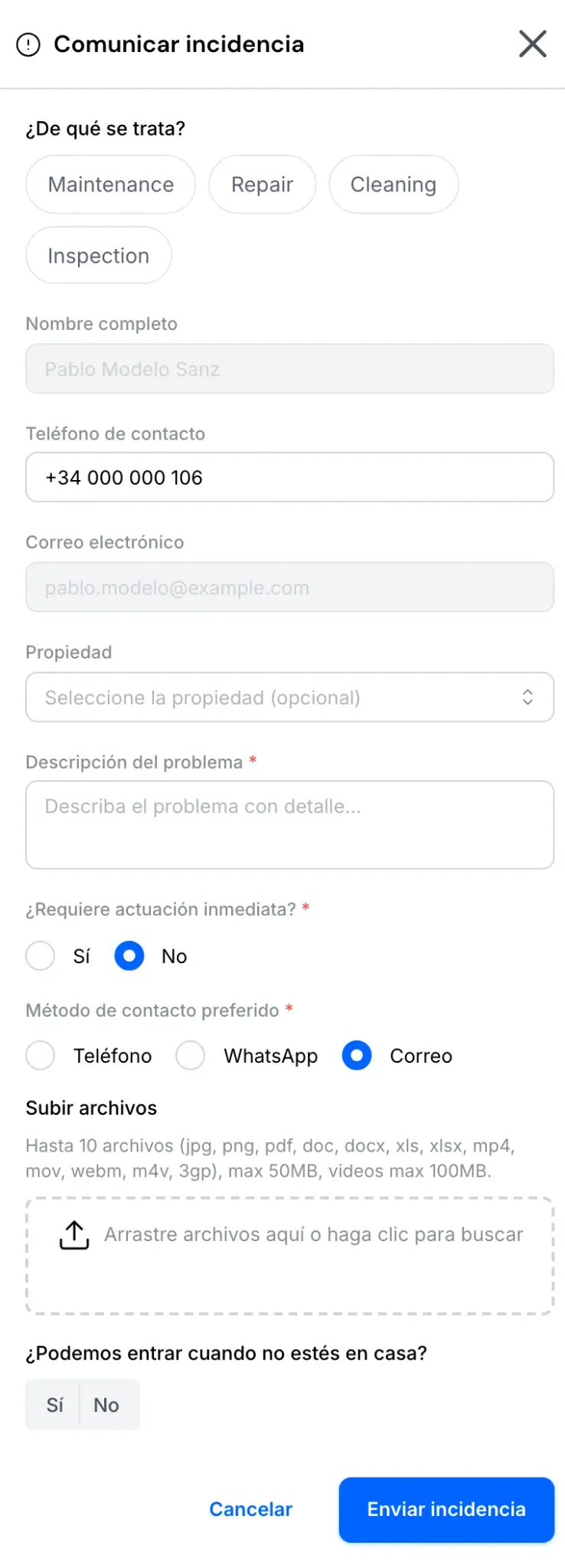
- Each repair request takes up to 10 photos or videos, with videos up to 100 MB.
The questions that come back with every stay
At Globexs we have let furnished flats in Valencia since 2002, and tenant calls are almost always the same: how much do I owe, to which account, where is my lease, how do I get to the flat and who do I tell about a repair. None of them needs someone from the team if the answer is written down somewhere the tenant can find it.
In mid-term rentals the problem multiplies. A new tenant moves in every few months, many don't speak Spanish and almost all of them ask from their phone. A portal earns its place if it answers exactly those questions, in the tenant's language, and nothing else.
Before move-in: a five-step path
The portal's home page shows the stay with a photo, dates, arrival guide and directions. Below it sits the move-in path: contract, move-in payment, confirmation, check-in and check-out. The steps follow the booking's actual status at the agency, not the calendar, so the tenant can see whether their payment has been recorded.
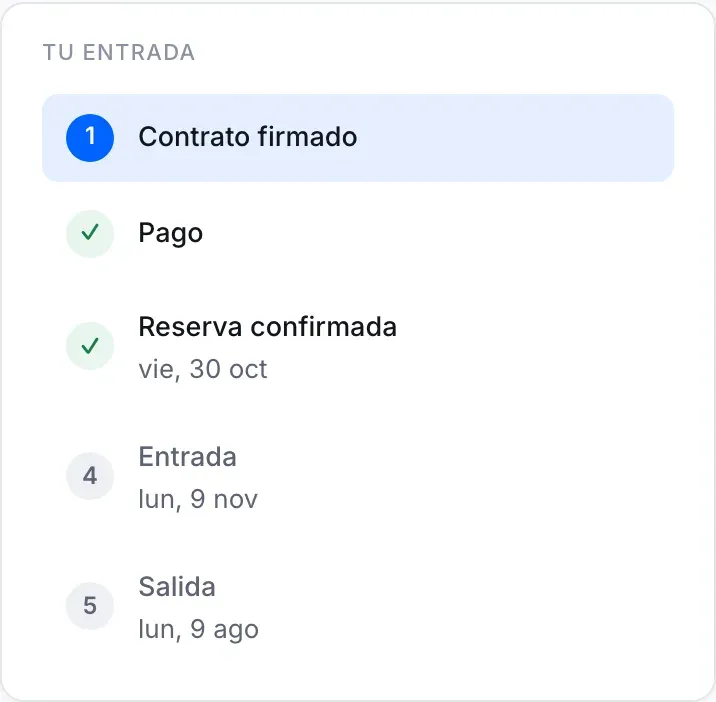
The signed lease appears under Documents and My Stay as soon as the booking is confirmed. The agency decides per booking whether to share it; by default it is shared with the tenant and not with the owner.
Payments: only what is due now
Long stays generate payment slips in advance. If the portal showed them all, the tenant would pay too much or call to ask which one is due. So the "To pay" card shows only what is due now and, separately, the next payment; the payments page adds the bank details, ready to copy with one tap.
Tenants pay by bank transfer. The portal does not take card payments: Rentamos has no online payments yet, and it is worth saying so in the welcome email. When the deposit comes back, the tenant sees the report with what was deducted and what was refunded; how to track deposits across a whole portfolio is covered in rental deposits across a portfolio in Spain.
Repair requests that arrive complete
When something breaks, the tenant picks a category (the same ones the agency uses for its work orders), describes the problem and attaches up to 10 photos or videos. They also say whether it is urgent, how they prefer to be contacted and whether someone may enter the flat while they are out. The team gets the request with all of that in view, without a second call to ask for photos or arrange access.
Companies with several flats
In corporate housing, one company may have three employees in three flats. Instead of a single card, its portal shows "My stays" with one row per flat and the next step for each. Whoever handles the stays at the company sees the status of all of them without writing to the agency.
Limits
- No card payments or direct debit: bank transfer details only.
- No native tenant app: it is a web portal built for phones.
- The portal can only show what the agency has in Rentamos: no arrival guide or no payment slips issued means nothing to show.
If you want to see how the portal would look with your flats, book a free 20-min call. If you are still comparing tools, start with what short-term PMS tools miss.
Step by step
1. Turn on tenant portal access · 1 min per booking
From the customer list, or with an automation when the booking is confirmed. With the automation, a tenant who already has access gets no new password and no second email.
2. Add the arrival guide and the lease · 10 min per flat
The arrival guide comes from the sections of the property manual and is written once. The signed lease is shared with the tenant by default; you can switch that off per booking.
3. Issue payment slips and check the repair categories · 15 min
The portal uses your work order categories. Make sure their names make sense to a tenant.
Frequently asked questions
What should a tenant portal for a rental agency include?
Whatever reaches you by phone today: what to pay now and to which account, the signed lease, how to get to the flat and a way to report repairs with photos. If it is also in the tenant's language and works on a phone, it replaces most of those calls.
Can tenants pay by card in the Rentamos portal?
No. The portal shows what is due and the bank details for the transfer, but Rentamos does not have online card payments or direct debit yet.
Which languages is the tenant portal available in?
Seven: English, Spanish, French, Dutch, Portuguese, German and Polish. The language comes from the tenant's profile, and the tenant can switch it in the portal header.
Is there a tenant app?
There is no native tenant app. The portal is a website built for phones, with a bottom navigation bar, opened from the link in the access email.
What changed in this guide
- First published.
Want to see this running on your own portfolio? We'll walk you through it on a free video call: Book a free 20-min call.
A 20-minute call. No deck. Real product.
We'll show you the modules that match your operation, walk through your current pain points, and tell you honestly whether Rentamos is the right fit.
No commitment, no credit card.